
Let's be honest: setting up cold email infrastructure is a massive headache. If you’ve spent any time in the B2B outbound trenches, you already know the drill. You buy a bunch of domains on Namecheap, navigate the maze of Google Workspace or Microsoft 365 to create user accounts, pay for expensive individual licenses, and then spend hours copy-pasting DNS records.
And if you get even one character wrong in your SPF, DKIM, or DMARC records? Your emails go straight to the spam folder, and your campaign is dead before it even starts.
Because of this nightmare, a whole cottage industry of "done-for-you" inbox services has popped up. One of the newer platforms making waves in this space is ColdEmailInboxes.io.
I wanted to look past the marketing copy and see what's actually going on under the hood. In this review, we’re going to break down what they actually offer, dig into their pricing, and analyze their approach to deliverability. Is it worth your money, or should you just keep building your own infrastructure? Let's find out.
What Exactly is ColdEmailInboxes.io?
At its core, ColdEmailInboxes.io is basically an infrastructure-as-a-service platform for lead generation agencies and B2B sales teams.
Instead of playing IT admin for a weekend, you outsource the entire setup process to them. They handle the messy stuff: configuring domains, provisioning the actual inboxes, setting up the authentication records, and dealing with API connections. Once they're done, they hand you a neat list of ready-to-send inboxes that you can plug directly into your favorite cold email sequencer.
They quote a 24 to 48-hour turnaround time. Why not instant? Because DNS propagation takes time, and rushing the API connections usually leads to errors. It’s a realistic timeline that shows they aren't cutting corners.
Pricing and Packages: Breaking Down the Math
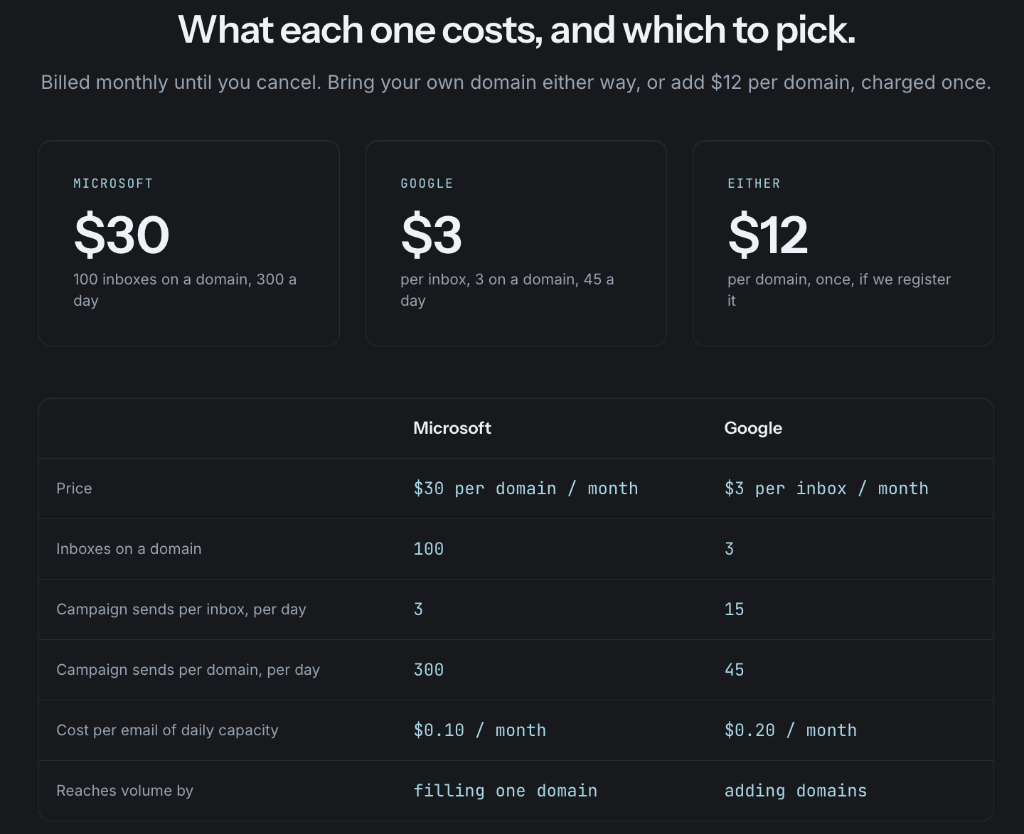
ColdEmailInboxes.io keeps things surprisingly simple. They don't have confusing tiered credits. Instead, they split their offerings based on the two major email heavyweights: Microsoft 365 and Google Workspace. They also have a third option specifically designed for agencies who want more control.
1. The Microsoft 365 Setup (The Volume Play)
The Cost: $30 per month. What You Get: 100 Microsoft 365 inboxes built on a single domain.
This is their high-volume, cost-efficient option, but here is where things get interesting. The cold email space is full of "gurus" telling you to blast 50 or 100 emails a day from a single inbox. ColdEmailInboxes.io pushes back hard against this. They specifically advise sending only 3 emails per day per Microsoft inbox.
At first glance, that sounds insanely low. But when you do the math, your $30/month gets you a safe sending capacity of 300 emails per day across that single domain. By spreading the load across 100 inboxes, they are protecting the domain's reputation while still giving you serious volume.
2. The Google Workspace Setup (The Premium Play)
The Cost: $3 per inbox per month. What You Get: Up to 3 Google inboxes on a single domain.
It’s an open secret in the outbound world that Google Workspace inboxes tend to have slightly better deliverability if your prospect list is heavy on Gmail users. Because of Google's pricing structure, ColdEmailInboxes.io charges more per inbox here and places a hard cap of 3 inboxes per domain.
For Google, they advise a slightly higher limit of 15 emails per inbox per day. This yields about 45 total daily emails per domain. It costs roughly twice as much per email sent compared to the Microsoft setup, but if you need that Google-to-Google deliverability bump, it's the price of doing business.
3. The Agency Option (DIY Tenants)
The Cost: $9 per Microsoft 365 tenant ($8.50 if buying in bulk). What You Get: If you run an agency and prefer a DIY approach to save on margins, they sell raw Microsoft 365 tenants. You can then provision your own inboxes on them for a fraction of the cost.
What About Domain Ownership?
A major red flag with some "done-for-you" infrastructure services is that they register the domains under their own company name. If you ever leave their service, they hold your sender reputation hostage.
ColdEmailInboxes.io avoids this entirely. You can bring your own domains to the platform at no extra charge. Alternatively, they will buy a domain for you for $12, and they explicitly register it in your name. It’s your asset, plain and simple.
The Good: What They Get Right
1. A Brutally Realistic Approach to Deliverability Perhaps the most refreshing aspect of ColdEmailInboxes.io is their conservative stance on sending limits. They understand deep platform limitations that most casual users completely miss. For example, Microsoft has a Tenant External Recipient Rate Limit. This means Microsoft doesn't just throttle an individual mailbox if it acts spammy; they throttle the entire tenant. By keeping their limits low and spreading the volume, ColdEmailInboxes.io shows they actually understand enterprise email infrastructure.
2. Zero DNS Headaches Getting your SPF, DKIM, and DMARC wrong is the fastest way to ruin a campaign. Having this handled—and properly verified—before the handoff removes the biggest technical point of failure for sales teams.
3. Agency Friendly The ability to buy raw tenants for $9 shows they understand the agency business model, where margins on infrastructure can make or break profitability.
The Cons: Limitations to Consider
It isn't a magic bullet. Here are a few things to keep in mind before you buy:
1. The Limits Can Feel Restrictive Their hard limit of just 3 Google inboxes per domain might feel like a straitjacket to some users. If you are used to packing 10 Google inboxes onto a single domain to save money on yearly domain registration fees, you will have to adjust your strategy. It’s safer, yes, but it requires buying more domains.
2. You Have to Be Patient Because they wait for DNS propagation and API settling, deployment takes 24 to 48 hours. If you just signed a massive client and need inboxes live today, you are out of luck.
3. They Don't Warm Up the Inboxes for You They provide the infrastructure, but you still need to connect them to a sequencer and run them through a proper 14-day warmup cycle before launching your campaigns. They build the car, but you still have to break in the engine yourself.
Frequently Asked Questions (FAQ)
To clear up a few common points of confusion, here are the answers to the most frequent questions about their service.
Do you own the domains, or do they? You own them. You can bring your own domain for free, or ask them to purchase one for $12. If they buy it, they register it in your name.
What exactly does the $30 a month Microsoft plan include? You get 100 Microsoft 365 inboxes on one domain. Every inbox is pre-provisioned and configured with SPF, DKIM, and DMARC.
Should I choose Microsoft or Google inboxes? If you want the highest daily volume at the lowest price, go with Microsoft. If your lead list consists mostly of Gmail addresses and you want the highest possible inbox placement, go with Google (though it will cost you about twice as much per email sent).
Why do they only allow 3 Google inboxes on a domain? This is a deliverability safeguard. Loading up a domain with too many sending accounts degrades the domain's reputation rapidly. They cap it at three to ensure the domain survives. If you need more volume on Google, you simply need to buy more domains.
How long does it actually take to get my inboxes? Typically 24 to 48 hours. They don't rush the setup because DNS propagation and API connections need time to properly settle before the inboxes are safe to use.
The Verdict
ColdEmailInboxes.io isn't trying to reinvent the wheel, and thankfully, they aren't promising impossible "inbox placement hacks." They offer a straightforward, pragmatic service: they build safe, correctly authenticated email infrastructure so you don't have to waste your weekend doing it.
If you are a solo founder running a single domain, you can probably just follow a YouTube tutorial and set it up yourself to save thirty bucks. But if you are a growing sales team or a lead generation agency trying to scale across dozens of domains and hundreds of inboxes, the time saved by outsourcing this is massive.
They know the technical limitations of Microsoft and Google intimately, and they've structured their products to keep you safely underneath the spam filters. As long as you write good copy, properly warm up your domains, and use a reliable sequencer, ColdEmailInboxes.io is a highly dependable solution for scaling your outbound infrastructure.
Written by Vishal Raghuwanshi
Founder, InvokeIQ
Vishal Raghuwanshi is a software entrepreneur and B2B sales infrastructure expert focused on email deliverability, automation, and outbound strategy.
Tags
Get the weekly brief
Enjoyed this article?
One email per week with the best cold email strategies, templates, and deliverability tips.